imgproxy v4: Better observability


This is the fifth part of a series of blog posts about the new features in imgproxy v4. In this post, we’ll focus on the improved observability features. We’ll talk about how imgproxy provides better insights into its performance and behavior, making it easier to monitor and debug.
imgproxy v4 announcements:
- Internal Cache and changes to conditional request behavior
- Parallel image downloading
- Better SVG minification, RAW formats support, and colorspace preservation
- Image classification, cropping objects, and better autoquality
- Better observability
Faster logging
In imgproxy v4, we’ve switched from Logrus to the standard log/slog package for logging. This change was driven by multiple reasons:
-
Reduced dependencies: Simplicity is one of our core values, and reducing dependencies helps us achieve that. The standard library’s
slogpackage provides all the features we need without the need for an external logging library. -
Better performance: The
slogpackage is designed to be efficient and has a lower overhead compared to Logrus. Not that logging is a bottleneck in imgproxy, but if we can reduce the overhead of logging, why not do it? Our benchmarks show three times better speed and ten times less memory usage withslogcompared to Logrus:BenchmarkSlogPretty-10 1000000 1483 ns/op 280 B/op 4 allocs/op BenchmarkSlogStructured-10 1000000 1697 ns/op 280 B/op 4 allocs/op BenchmarkSlogJSON-10 1000000 1209 ns/op 280 B/op 4 allocs/op BenchmarkLogrusStructured-10 1000000 4487 ns/op 2590 B/op 59 allocs/op BenchmarkLogrusJSON-10 1000000 3908 ns/op 3392 B/op 53 allocs/op -
Better integration with dependencies:
slogbecomes the standard for structured logging in Go. If some of imgproxy’s dependencies use the defaultsloglogger, their logs will be automatically formatted with imgproxy’s logging format. Also, if some package just spews logs using thelogpackage, they will be formatted as well, as slog’s default logger becomes the default logger for thelogpackage. -
Logrus is pretty much abandoned: At the moment of switching to
slog, the latest release of Logrus was dated back in 2023.
Exporting logs to OpenTelemetry
The next improvement is good news for OpenTelemetry users. In imgproxy v4, we added support for exporting logs to OpenTelemetry collectors. This allows you to collect logs from all your imgproxy instances in a centralized place, making it easier to monitor and debug your image processing pipeline.
Better options representation in logs, traces, and error reports
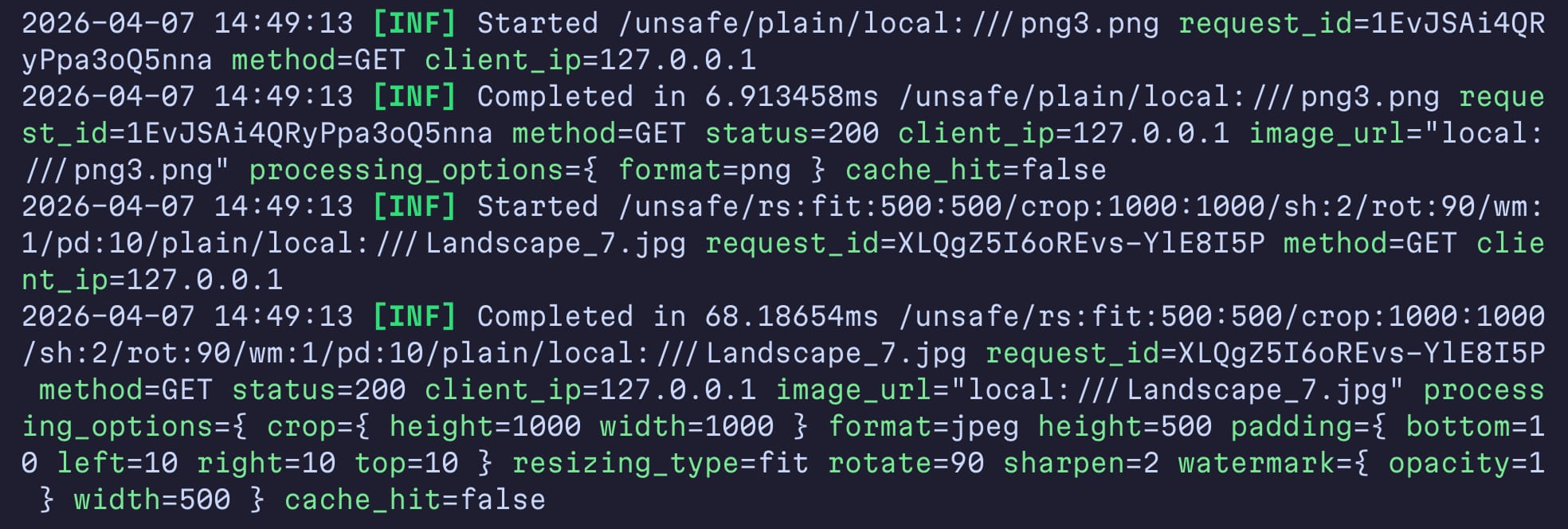
In imgproxy v3, processing and info options were represented in logs, traces, and error reports in the way imgproxy stores them internally. While this representation gave a general idea of which options were used, it didn’t match how options are represented in the documentation and URLs.
In imgproxy v4, we changed this. Now, option and their argument names in logs, traces, and error reports match the documentation and URL representation. This makes it easier to understand what options were used and how to fix any issues that might arise.
Links to documentation in error reports
In imgproxy v4, we also added links to the documentation in error reports when applicable. This means that if an error occurs due to a misconfiguration or an invalid option value, the error report and logs will include a link to the relevant documentation section that explains how to fix the issue.
Pretty error pages in development mode
By default, imgproxy responds with a public error message when something goes wrong, which is good for security in production. However, during development, it’s often useful to see the full error message and stack trace. That’s why imgproxy has a development errors mode that you can enable with the IMGPROXY_DEVELOPMENT_ERRORS_MODE environment variable.
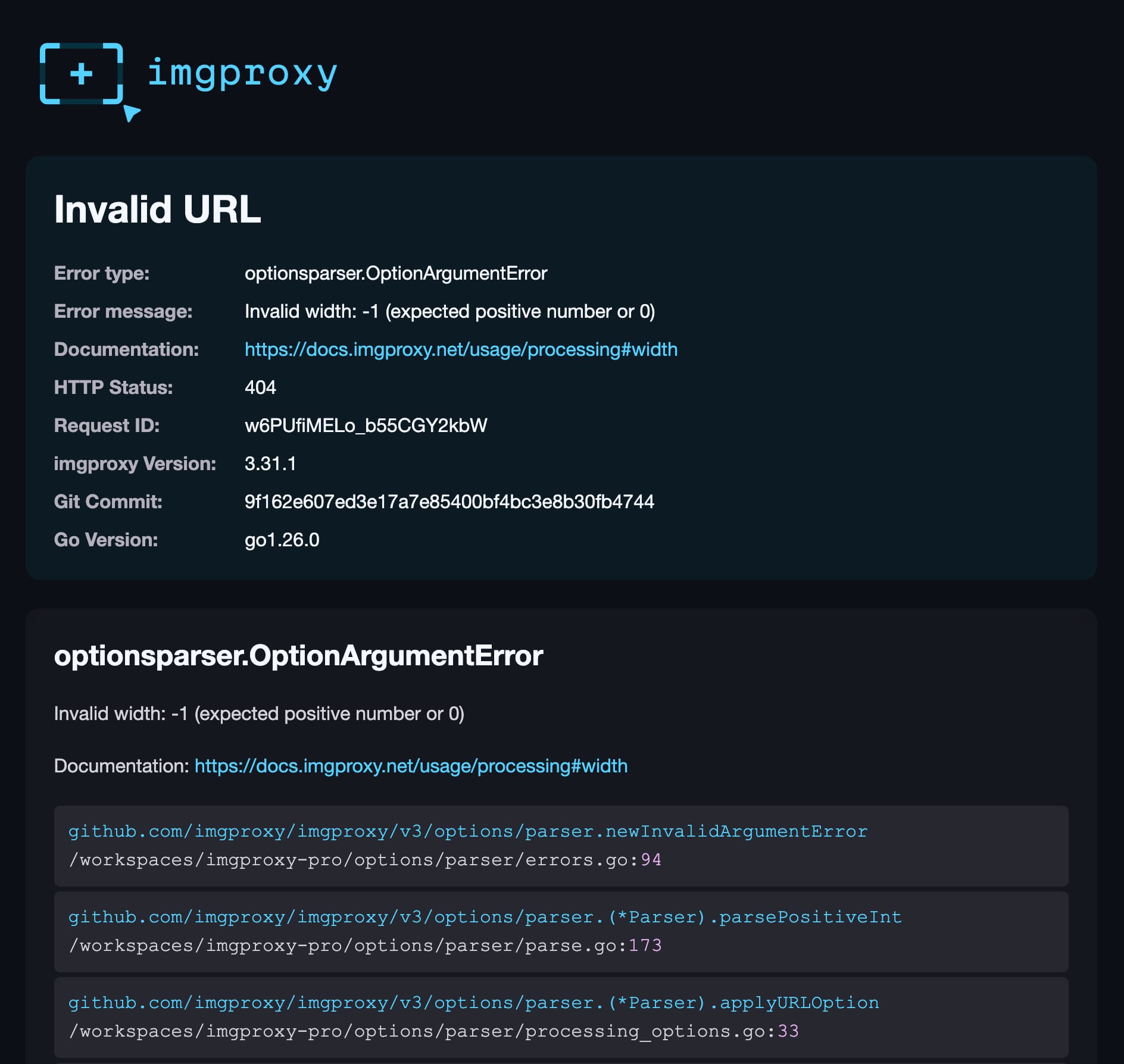
In imgproxy v4, we improved the development errors mode. Now, instead of just showing the error in plain text, imgproxy shows a pretty error page with more details, including:
- The public and private error messages
- The error type
- Full error chain with stack traces (where they can be captured)
- The HTTP response status code
- A documentation link, if applicable
- imgproxy version and build information
- And more!
Here’s what you’ll see when you use an invalid width option value:
More detailed distributed tracing
imgproxy v4 adds more request spans to distributed traces (OpenTelemetry, Datadog, New Relic), making it easier to understand the flow of image-processing requests and to identify performance bottlenecks. For example, imgproxy v4 adds spans for:
- Custom watermarks and fallback images downloading
- Video decoding. Previously, the time spent on video decoding was included in the source image downloading span
- Internal cache retrieval and storage
Additionally, imgproxy v4 introduces the optional propagation of the original request’s trace context to external requests made by imgproxy, such as image downloads. This allows you to see the full flow of your image processing pipeline in your tracing system.
imgproxy v4 improves observability in many ways, making it easier to resolve those rare cases where imgproxy decides to misbehave. Though we hope that these improvements will never be needed, we are glad to have them in place. Just in case.
The release of imgproxy v4 is just around the corner! And if you can’t wait to try it out or want to help with testing, you can get free access to the pre-release builds of imgproxy Pro v4 – just apply to our Early Access program!