imgproxy v4: Parallel image downloading


This is the second part of a series of blog posts about the new features in imgproxy v4. In this post, we will tell you about the parallel image downloading feature introduced in imgproxy v4 and how it can improve the performance of your image processing pipeline.

imgproxy v4 announcements:
- Internal Cache and changes to conditional request behavior
- Parallel image downloading
- Better SVG minification, RAW formats support, and colorspace preservation
- Image classification, better autoquality, and cropping objects
- Better observability
The thing that was missing
To better describe what happened here, let’s start with the way images are processed. Traditionally, everything happens sequentially: the source image is decoded, then the transformations are applied one by one, and finally, the result is encoded to the output format. This is the approach that most image processing libraries take.
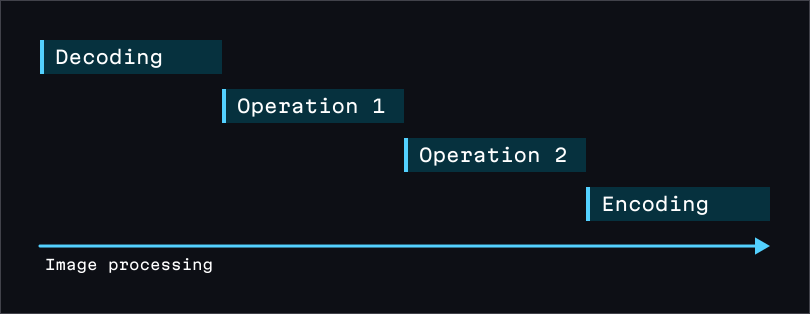
libvips (the image processing library that powers imgproxy), however, is a very different beast. The main idea behind libvips is demand-driven processing. This means that when you ask libvips to perform some transformations, it doesn’t execute them right away. Instead, it builds a processing graph and executes it only when you need the result, whether it is raw pixel data or an encoded image. More of that, libvips does it all in parallel, region by region.
From the very beginning, imgproxy was designed to get the most out of libvips, performing image transformations in the specific order to help libvips do its best. However, one last piece of the puzzle was missing.
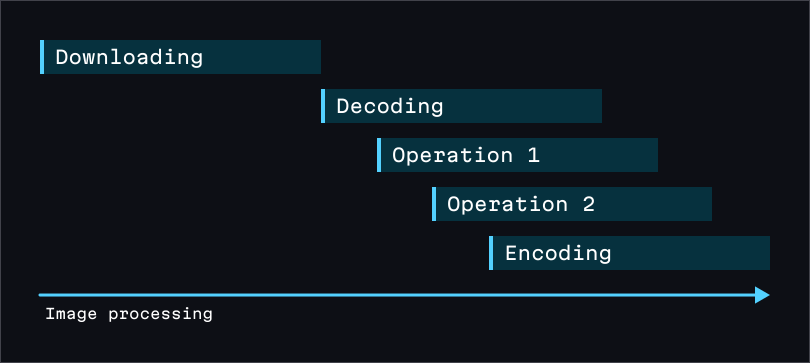
Since libvips not only processes but also decodes images in parallel, it doesn’t need the entire source image file to start processing; as soon as it has enough data to decode the first chunk of pixels, it’s good to go. Of course, this requires the image format to support progressive decoding, but the most popular formats, such as JPEG or PNG, do support it. And those decoders that can’t decode images chunk by chunk still may support decoding them from a stream.
That’s where imgproxy was lacking the opportunity. In imgproxy v3, the source image was completely downloaded before being passed to libvips. This basically meant that imgproxy was waiting too long before starting the processing.
A problem in a problem in a problem
The solution may seem obvious in hindsight: just wrap the image source response stream into a libvips source and let it do its magic. However, things are way more complicated than that.
The main problem is that HTTP response streams are not seekable. And this is a problem because of multiple reasons:
- Some image decoders require seeking. For example, the HEIC/AVIF decoder needs to seek back and forth in the source image file to decode it properly. Of course, libvips has a workaround for this: if the source is not seekable, it will read the entire image into memory and then decode it from there. But this completely ruins the whole idea of parallel downloading.
- We may need to reopen the image. imgproxy actively uses the scale-on-load feature provided by some image formats. Yet to do so, imgproxy needs to reopen the source image with different parameters. This is not possible if we can’t rewind the source back to the beginning.
- imgproxy needs to detect the image format before processing. This is necessary for various reasons. One of them is that imgproxy’s format detection approach is more comprehensive than the one used by libvips. So imgproxy needs to read at least the beginning of the image file.
- Some parts of imgproxy require independent stream access. This means that multiple readers from the same source image stream should not interfere with each other.
Another big problem is error handling. There are many things that can go wrong during image downloads: timeouts, connection drops, unexpected end of the stream, etc., and we should know exactly what went wrong to handle it properly. Yet libvips doesn’t know or care what is going on with the source; it only knows whether the read was successful. So we need to catch the reading errors on our side.
And last but not least, this approach would require waiting until libvips finishes processing before we can close the source image stream. This means that we would have to keep the HTTP connection busy longer, preventing it from being reused for other requests.
The solution
In the end, we came up with the idea of an asynchronous buffer that fills with data from the image source response in the background and allows reading any part of it at the same time. The buffer can create readers with independent states. If the data at the current reader’s position is not yet available, the reader waits until it is. This approach has significant benefits:
- The data is buffered, so it is seekable.
- Since the readers’ states are independent, they can be used in different parts of the processing flow without interfering with each other. If we need to reopen the image, we just create a new reader from the same buffer.
- The buffer can catch the stream reading errors and provide them to imgproxy, allowing it to handle them properly.
- The buffer can close the source image stream as soon as it is fully read.
The buffer’s readers are easily wrapped into libvips’ seekable sources. This approach also simplified many other aspects of imgproxy, as we no longer need to worry about how much data has been read so far.
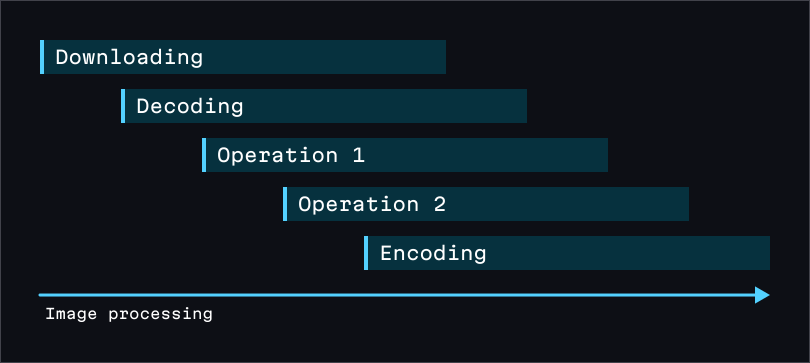
Parallel image downloading enables imgproxy to leverage the full potential of libvips, improving image processing performance, especially for large image files and slow image sources. We are excited to see how this feature will benefit our users and look forward to your feedback!
More announcements are on the way, so stay tuned! And if you want to test how parallel image downloading works in practice, just apply to our Early Access program!